

Export contacts in CSV format
From the members section of the dashboard you can download different lists of users in csv format.
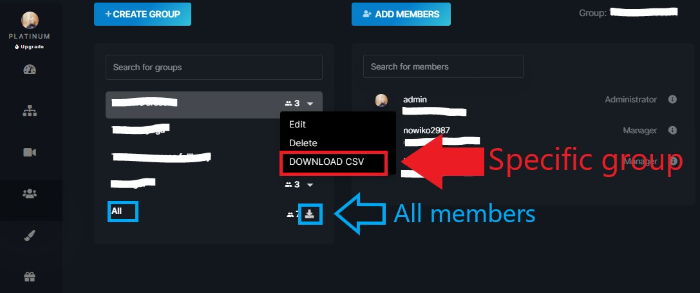
To download lists of users belonging to a specific group, select the arrow in the drop-down menu belonging to the group and click on "Download CSV". To download lists of: - all platform users, - all registered users, - paying users (possibly of a specific series), -non-paying users (possibly of a specific series), select the download button of the All members group.
Is this article helpful?
Articles in this section: 10 articles
- Connect Zapier with Teyuto
- Sell your contents (with multi currency)
- Export contacts in CSV format
- Create and Start a Live Streaming
- Create a Custom Page
- How to embed a video into an external website
- Edit a video quiz (and display results)
- How to customise the homepage
- How can I set a custom domain?
- How to cancel your Teyuto Account